
SHOWING EXACT MATCHES FOR FILE VERSIONS
We added an Exact match option to the Device Files screen’s File Version search. The default search is still a partial search; you click the Exact chip (which makes the chip green) before typing the exact file version you need.

CANCELING A JOB FROM ITS OWN TAB
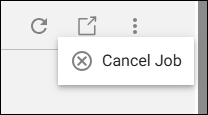
On the Provisioning >> Jobs screen, when you view a single job on its own tab, you can now cancel the entire job by clicking the new overflow menu at the top right and then Cancel Job. As with other job views (such as My Jobs and All Jobs), you can cancel the job only if it hasn’t completed or failed.
SCHEDULING DATA SYNCING FOR DEVICES
We fixed an issue with the Bulk Device Actions dialog box’s Schedule DataSync option that was producing the error “Please provide valid action type.” Now, the bulk data sync will be processed correctly.
LAUNCHING DETAILS FROM LINKS ON THE FILES TAB OF DEVICE DETAILS
On the Files tab of the Device Details window, we fixed a bug that was preventing the links on the Job ID screen (such as ESNs in the Task grid’s ESN/Serial Number column) from working. Navigation between device details and job details now works consistently across the Devices screen, Jobs module, and global search.
SHOWING ALERTS ON THE ALERT HISTORY TAB
We fixed an issue that would produce an error when you tried to open the Device Details window’s Alert History tab or would freeze while loading. The tab now correctly displays the alerts and alert acknowledgment data.